The 4K Lie: Why Your OTT Stream Isn't As Premium As You Think
How OTTs fool you in the name of "Asli 4K" and Why a 1080p movie can look better than 4K in the cinemas.
Introduction
For years, streaming platforms have conditioned us to believe that 4K equals quality. Every OTT subscription upgrade, every smart TV advertisement, and every smartphone launch seems to revolve around one magical term: 4K.
But if you look at how movies are actually delivered, you'll notice something interesting. Many theaters still project films in 2K, and some older systems effectively operate around 1080p-level resolutions. Yet your smartphone proudly advertises 4K playback.
So here's a question:
If you take a 4K video shot on your phone and project it onto a giant cinema screen, will it automatically look like a theatrical release?
Not necessarily.
That's because resolution is only one piece of the video quality puzzle. A poorly compressed 4K stream can often look worse than a well-encoded 1080p video. In many cases, what you're watching on your OTT platform is technically 4K, but far from the highest-quality version of that content.
Modern video quality depends on multiple factors working together:
- Resolution
- Bitrate
- Codec efficiency
- HDR
- Source quality
- Display technology
Let's break down why.
The Biggest Myth: More Pixels = Better Quality
Most people assume video quality is determined solely by resolution.
A 1080p frame contains roughly 2 million pixels, while a 4K frame contains over 8 million pixels. On paper, that sounds like a massive upgrade, but pixels alone don't determine image quality. What matters is how much visual information those pixels actually contain.
Think of resolution as the size of a pizza:
- 1080p = Medium Pizza
- 4K = Large Pizza
A larger pizza gives you more surface area, but it doesn't automatically taste better. In the same way, 4K gives you more pixels, but those pixels still need enough detail to display.
A 1080p frame is 1920 × 1080 pixels (about 2.07 million pixels), while a 4K UHD frame is 3840 × 2160 pixels (about 8.29 million pixels). That's exactly four times more pixels, but increasing the canvas size doesn't automatically improve texture detail, color accuracy, contrast, or motion quality.
Imagine ordering a larger pizza but using the same amount of cheese and toppings. The pizza is bigger, yet every slice feels less satisfying. That's what happens when a video has more pixels but not enough information to fill them. If the source is low quality or heavily compressed, those extra pixels simply spread the same limited detail across a larger grid.
The Hidden Number Nobody Talks About: Bitrate
If resolution tells you how many pixels exist, bitrate tells you how much information those pixels contain.
Bitrate is measured in Mbps (Megabits per second) and represents how much data is available every second to describe the video.
For example, if YouTube shows a stream running at 20 Mbps, it means approximately 20 million bits of video data are being delivered every second.
Higher bitrate generally means more detail survives compression, while lower bitrate forces the encoder to throw away information.
A high bitrate helps preserve:
- Fine textures
- Shadow detail
- Smooth motion details
- Natural-looking images
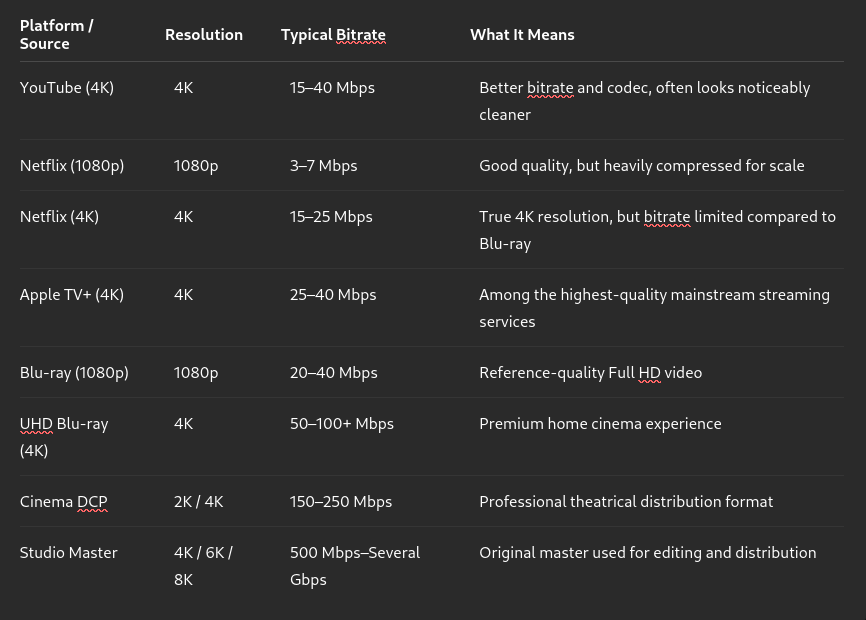
Notice something interesting: Netflix 4K has four times more pixels than 1080p, but it doesn't necessarily have four times more bitrate. As a result, each pixel often receives less information than people expect.
People feel Apple TV has better quality than others when the resolution is the same, that's because of higher bitrate and better encoding.
Now let's connect this to internet speed.
Suppose you have a blazing-fast 100 Mbps internet connection. Many people assume that means they can watch content at cinema quality.
Not really.
Your internet speed only determines how much data can be delivered to you. The actual quality depends on how much data the streaming service chooses to send.
If Netflix sends a movie at 20 Mbps, your 100 Mbps connection doesn't magically turn it into a 100 Mbps stream. You're still receiving only 20 Mbps worth of video information.
That's why two videos labeled "4K" can look completely different.
One thing I genuinely appreciate about YouTube is that it is relatively transparent about this. With YouTube Premium, some videos offer an "Enhanced Bitrate" option instead of marketing it as some magical new resolution.
However, the improvement is often smaller than people expect. The 1080p Premium stream typically has only around 10–15% more bitrate than the regular 1080p stream. The difference exists, but for many videos it is fairly subtle.
By comparison, jumping from 1080p to 1440p on YouTube often gives you a much larger bitrate increase sometimes 2–3× higher bitrate depending on the content and codec used. That's one reason why many users notice a bigger quality improvement when selecting 1440p or 4K rather than using 1080p Premium.
It's also why YouTube generally doesn't offer the 1080p Premium option on videos that already have 1440p or 4K versions available. At that point, the higher-resolution streams already receive significantly more bitrate and better encoding treatment.
Continuing our pizza analogy, resolution gave us the pizza size. Bitrate determines how many toppings are available. A giant pizza with barely any toppings can feel disappointing, while a medium-sized pizza loaded with premium toppings often feels far more satisfying.
A Real Example You Can Test Yourself
If you want to see bitrate differences in action, watch this video:
Once you start looking carefully, you'll begin noticing differences that previously went unnoticed.
Why Motion Makes Compression Problems Worse
This is where bitrate becomes even more important.
In the Video when the scene is mostly static, the encoder doesn't need to store much new information. Large portions of the image remain unchanged between frames.
But when:
- The car moves quickly
- A crowd enters the frame
- Camera movement increases
- Explosions, smoke, or particles appear
the encoder suddenly has far more information to process.
If the bitrate remains limited, the encoder must decide what information to keep and what information to discard.
That's when you start seeing:
- More color banding
- Smearing
- Loss of texture
- Reduced shadow detail
- Motion artifacts
This is what people mean when they talk about poor motion handling, color shifts, or compression artifacts.
The image isn't necessarily losing resolution.
It's losing information.
A Personal Example: WWE on Netflix
I first noticed this while watching WWE on Netflix.
During entrances, promos, or moments where people were mostly standing still, the image looked surprisingly good.
But once the action intensified and multiple wrestlers started moving rapidly around the ring, the image quality visibly dropped.
Why?
Because every frame suddenly required much more information.
The bitrate didn't increase proportionally, so each pixel effectively received less data.
As motion increased:
- Fine details became softer
- Compression became more noticeable
- Colors appeared less smooth
- Overall image quality felt worse
When the scene became calmer again, quality appeared to improve because the encoder no longer needed to describe as much movement.
This is one of the easiest real-world examples of how bitrate affects perceived quality.
The resolution never changed.
The amount of information available per frame did.
Why OTT Can Never Match Cinema Quality Exactly
This becomes even clearer when we do the math.
Let's assume a movie runs for 2 hours.
Netflix 4K at 20 Mbps
20 Mbps × 7200 seconds = 144,000 Megabits
144,000 ÷ 8 = 18,000 Megabytes
≈ 18 GB
Now compare that with a cinema-grade DCP at 250 Mbps.
Cinema DCP at 250 Mbps
250 Mbps × 7200 seconds = 1,800,000 Megabits
1,800,000 ÷ 8 = 225,000 Megabytes
≈ 225 GB
That's over 12 times more data for the same movie.
And that's before considering differences in mastering, color workflows, projection standards, and compression methods.
Even if you download the movie instead of streaming it, the file size itself reveals how much information is present. A 15–20 GB movie simply cannot contain the same amount of visual data as a 200+ GB cinema package.
In simple terms:
File Size ≈ Bitrate × Duration
So whenever you see a movie file that's dramatically smaller, it usually means one thing:
Some information has been compressed away.
That doesn't mean it looks bad. Modern codecs are incredibly efficient. But it does mean that OTT platforms are optimizing for bandwidth and convenience, not absolute image fidelity.
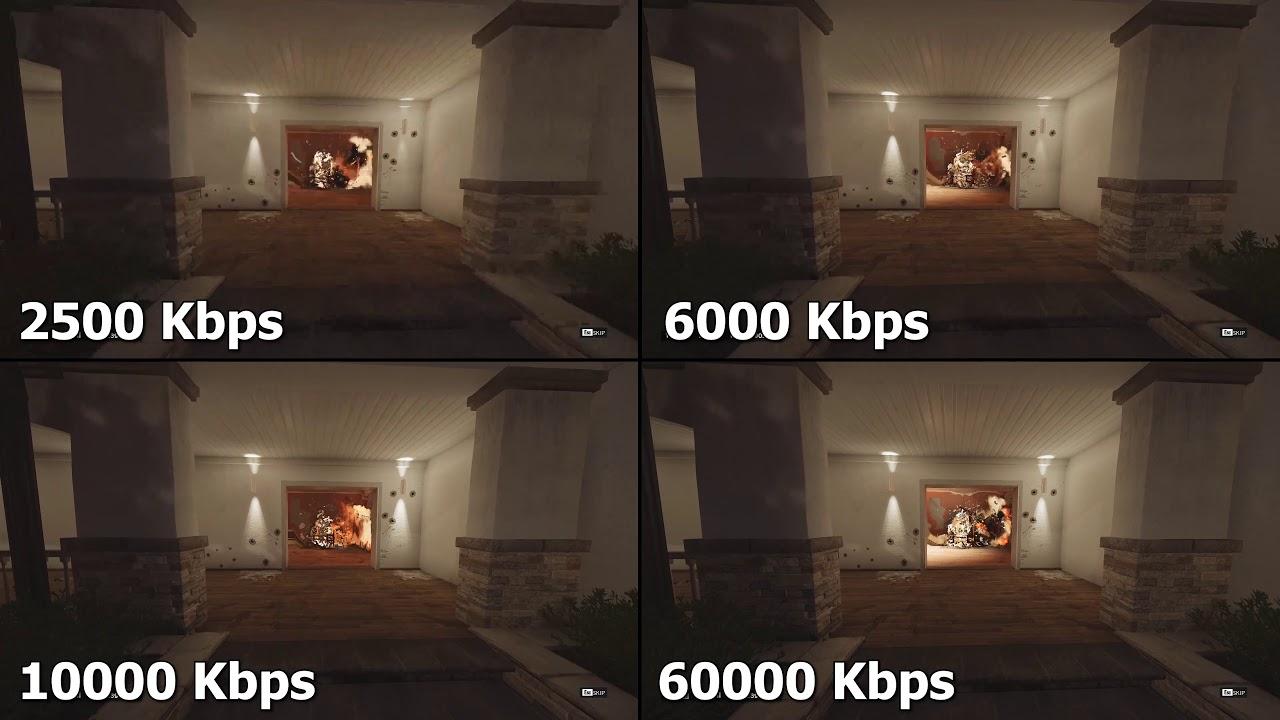
The following image shows video at same quality but different bitrates.
Why Most Movies Aren't Finished in Native 4K
A common question people ask is:
If 4K is better, why aren't all movies shot, edited, and mastered entirely in 4K?
The answer is that higher resolution dramatically increases complexity throughout the production pipeline.
Working with native 4K footage means:
- Larger file sizes
- More storage requirements
- Longer rendering times
- Heavier editing workloads
- More demanding color grading workflows
- Increased visual effects processing requirements
For many productions, especially those involving extensive VFX work, studios often use a 2K Digital Intermediate (DI) workflow. The movie may be captured using high-resolution cameras, but visual effects, editing, and final mastering are completed at 2K before being upscaled for 4K distribution.
This approach reduces costs and speeds up post-production while still delivering excellent visual quality.
This is also one reason why simply seeing a "4K" badge doesn't guarantee that every stage of the production was actually completed in native 4K.
Why OTT Platforms Compress Everything
Streaming companies serve content to millions of users simultaneously. Delivering every movie at Blu-ray or cinema-quality bitrates would require enormous storage and bandwidth.
To keep costs manageable and reduce buffering, OTT platforms compress their content heavily. A typical 4K stream may run between 15–25 Mbps, while a 4K Blu-ray can exceed 80–100 Mbps.
Both are labeled "4K," but one contains dramatically more image information.
Compression works by analyzing frames, identifying repeating patterns, tracking motion, and storing only the differences instead of saving every frame independently. This makes files much smaller, but it also means some visual information gets discarded.
When compression becomes aggressive, you may notice:
- Macroblocking
- Smearing
- Loss of texture
- Banding in gradients
- Reduced detail in dark scenes
Think of a pizza company delivering millions of pizzas every day. To save money, they slightly reduce the toppings on every pizza. Most customers may not notice immediately, but place it next to a premium version and the difference becomes obvious.
That's essentially what OTT compression does to video. The goal isn't maximum quality; it's acceptable quality at scale.
Why a 1080p Video Can Beat a 4K Stream
This sounds impossible until you compare bitrate.
Imagine two videos:
- 4K at 15 Mbps
- 1080p at 25 Mbps
The 4K version has four times more pixels, but it doesn't have proportionally more data. The encoder has to spread limited information across a much larger image, forcing heavier compression.
The 1080p version has fewer pixels to manage and more data available for each one. As a result, it can preserve:
- Cleaner textures
- Better shadow detail
- More natural motion
- Fewer compression artifacts
A useful concept here is bits per pixel. When resolution increases without a matching increase in bitrate, each pixel receives less information. That's why heavily compressed 4K content can sometimes look softer than a high-quality 1080p version, especially in scenes involving:
- Fast action
- Rain
- Smoke
- Fire
- Film grain
- Dark environments
Returning to our pizza analogy, imagine two pizzas:
Why 4K Looks Better on YouTube Even on a 1080p Screen
When you switch from 1080p to 4K on YouTube while using a 1080p screen, the video suddenly looks sharper.
How is that possible?
The answer is bitrate and encoding quality.
YouTube usually allocates more bitrate to higher-resolution streams and often delivers them using more efficient codecs such as VP9 or AV1. Even though your monitor cannot display 4K pixels, it receives a cleaner source that has more bitrates that is then scaled down to 1080p.
This process, known as downsampling, often reduces visible noise, smooths edges, preserves fine details, and makes compression artifacts less noticeable. It's similar to taking a high-resolution photograph and resizing it carefully, the final image often looks cleaner than one captured at the higher resolution to begin with.
Think of it as ordering a premium pizza and then cutting it into smaller slices. The slices may be smaller, but they're still coming from a better pizza.
That's why a 4K YouTube stream can sometimes look better than a 1080p stream even on a 1080p display.
Why Movie Theaters Use Massive Bitrates
Cinema-quality Digital Cinema Packages (DCPs) can use bitrates as high as 250 Mbps, which is more than ten times higher than many OTT streams.
The reason is simple: cinema screens are enormous.
When an image is projected across a screen that's dozens of feet wide, every compression artifact becomes easier to spot. Missing details, banding, and texture loss become much more noticeable, so theaters prioritize preserving image quality over saving bandwidth.
DCPs typically use:
- JPEG 2000 compression
- Very high bitrates
- Professional color workflows
- Strict mastering standards
Unlike streaming platforms, cinemas don't need to deliver content over consumer internet connections. They have a direct satellite connection that delivers the content to the theater.
Why Codec Matters
A codec is the technology used to compress and decompress video.
Popular codecs include:
- H.264
- H.265 (HEVC)
- VP9
- AV1
You can think of a codec as the packaging used to deliver the pizza. Better packaging protects the pizza while taking up less space.
Modern codecs are far more efficient than older ones. For example, AV1 at 15 Mbps can often deliver visual quality similar to H.264 at 25 Mbps. That's why two videos with the same bitrate can still look different depending on the codec being used.
Why HDR Matters
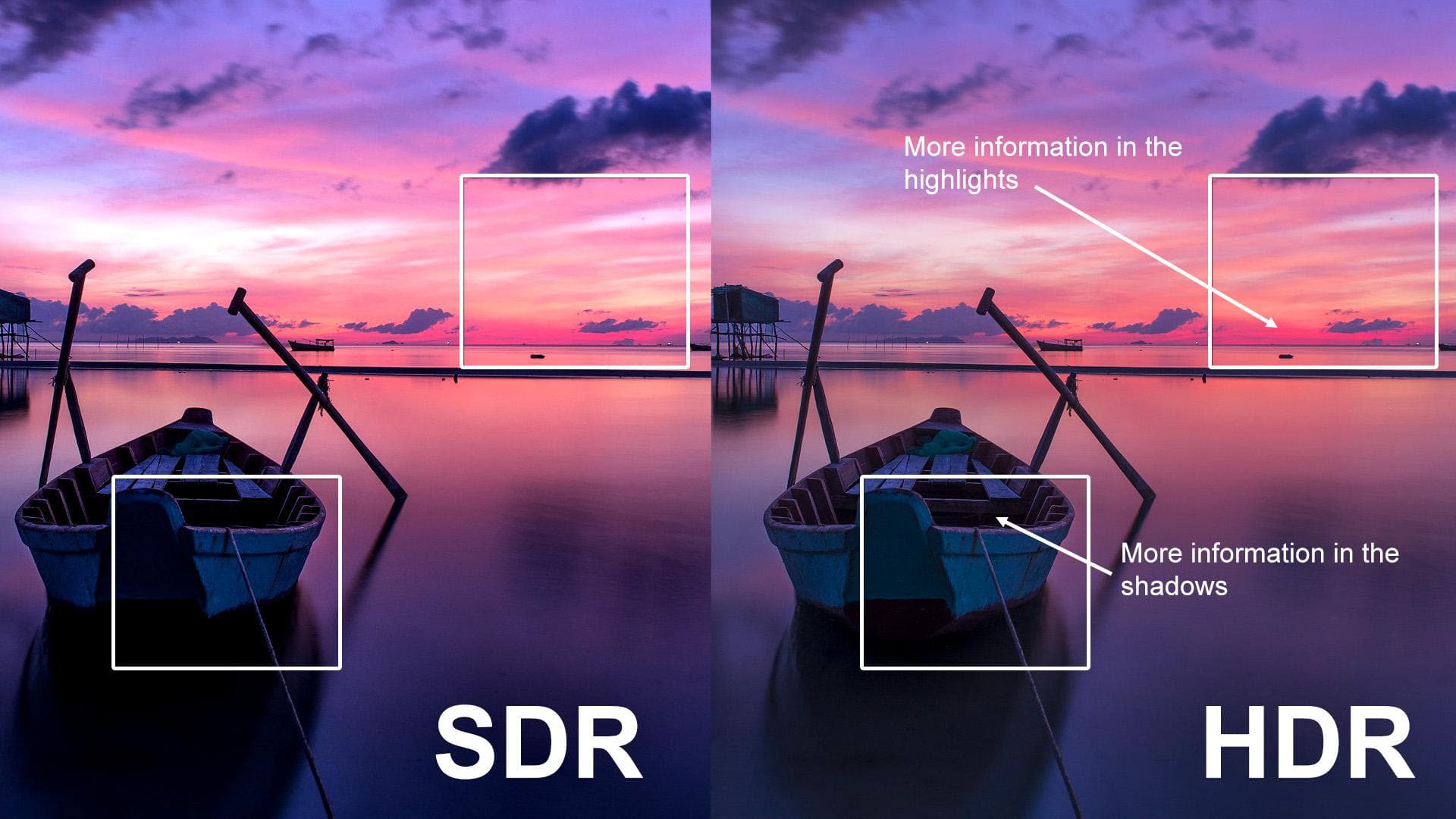
HDR (High Dynamic Range) improves:
- Brightness
- Contrast
- Color volume
- Shadow detail
If I say in more easy words the black spots are visible and overall color quality improves.
Most SDR content uses 8-bit color, which can display around 16.7 million colors. HDR content typically uses 10-bit color, allowing over 1 billion colors.
Think of HDR as upgrading the ingredients themselves. The pizza size hasn't changed, and neither has the number of toppings, but the ingredients are suddenly much richer.
This is why many viewers notice HDR improvements more easily than resolution improvements. A high-quality HDR presentation often creates a bigger visual impact than simply increasing pixel count.
When resolution, bitrate, codec efficiency, and HDR all work together, the final image becomes dramatically better.
"But I Have a 100-Inch TV and I Still Don't See Much Difference"
A common argument is:
"I have a 100-inch TV at home."
"I watch on a 32-inch monitor."
"Honestly, I don't see much difference between theater quality and what I get at home."
And that's a fair observation.
Part of the reason is that streaming providers have become extremely good at finding the sweet spot. Most OTT platforms deliver 4K streams around 15–25 Mbps, which is often good enough that the average viewer won't immediately notice what's missing.
In other words, they intentionally optimize quality so that most users feel satisfied while keeping bandwidth costs under control.
But there's another reason.
You may simply not have experienced significantly better quality side-by-side.
Human perception is relative. If you've only watched compressed streams for years, your brain starts treating that as normal.
For example, look at a gradient image with poor bitrate or poor color depth. You'll often notice visible color bands where one shade abruptly changes into another.
Instead of a smooth transition from dark blue to light blue, you'll see distinct stripes.
Now compare that with a properly encoded high-bitrate version. The colors blend smoothly into each other, creating a much more natural image.
This effect is called color banding, and once you notice it, it's difficult to ignore.

Conclusion
The Video Quality Hierarchy we usually think
4K > 1080p > 720p
But in reality, it looks more like this:
Source Quality > HDR > Bitrate > Codec > Display Quality > Resolution
The next time you hear, "ASLI 4K / Real 4K", remember this:
- Resolution determines how many pixels exist.
- Bitrate determines how much information those pixels contain.
- Codec determines how efficiently that information is compressed.
- HDR determines how rich and realistic the image feels.
A well-encoded 1080p video can absolutely outperform a heavily compressed 4K stream because image quality isn't just about pixel count, it's about how much information survives the journey from the camera to your screen.
To summarize our pizza analogy:
- Resolution = Pizza Size
- Bitrate = Amount of Toppings
- Codec = Packaging Efficiency
- HDR = Ingredient Quality
Thanks for reading this far :)